Showing posts with label Tamiya. Show all posts

Tuesday, 4 February 2020

Gaslands! Tamiya Half-track (1:35)

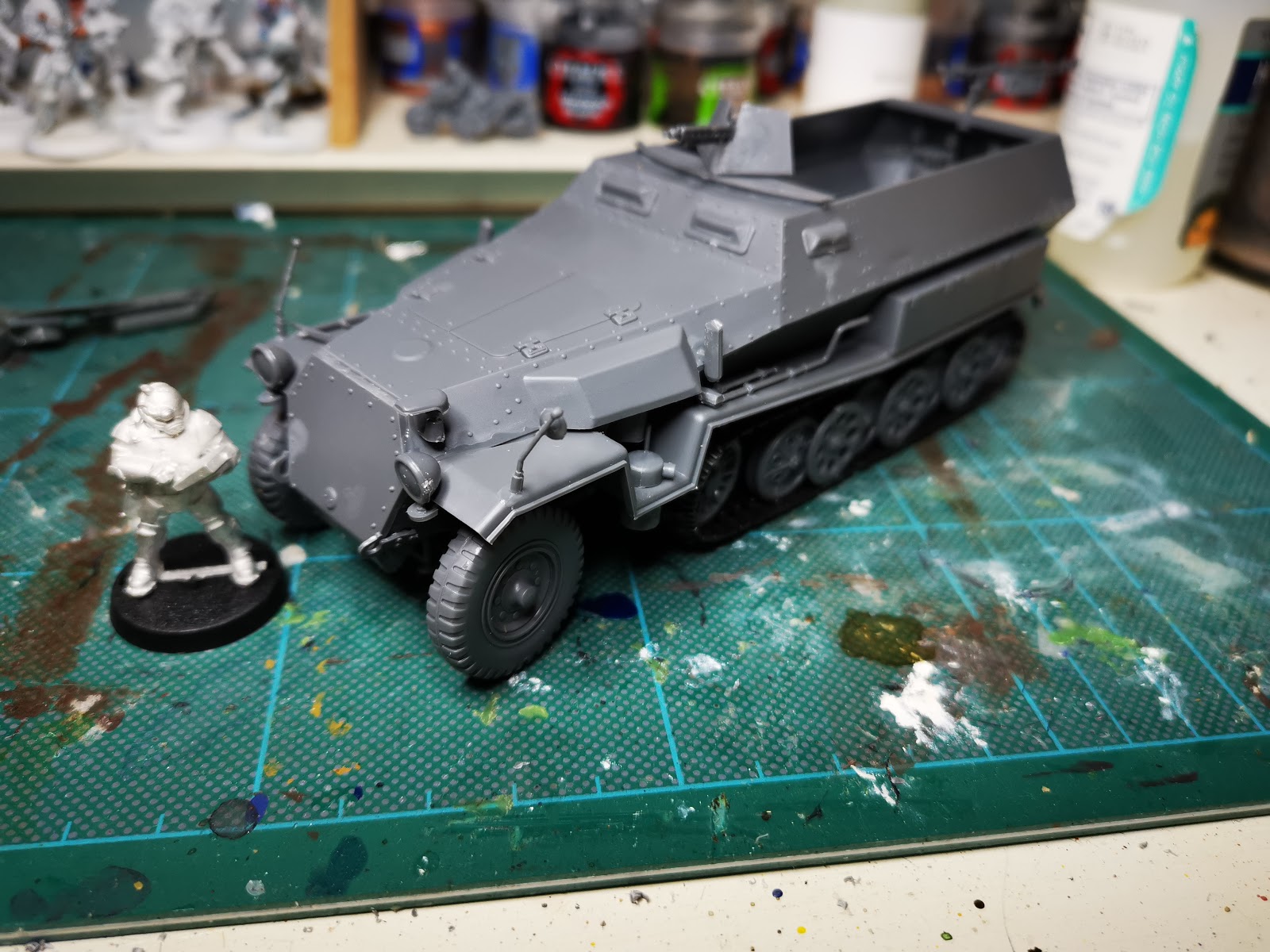
I've added another vehicle to my 40k motorcade (for Rogue Trader or from Gaslands!), this time an historical model pimped up with some sci-fi, kit-bashed additions.
The main model (1:35) is an excellent Tamiya, German half-track - a vehicle that has a whole host of detail and tiny bits of plastic on it's sprue to keep you challenged when constructing. The wheels and tracks are all moveable, but I decided to glue them in place to make painting a bit easier. I think the larger scale just about works. The additions to the build include an Ork gun (rear) and skull, a metal lasergun (?), bits from a computer motherboard, pieces of lego, rolled greenstuff, plasticard plating and other futuristic bits that I found that I believe are from Ramshackle Games.

Here you can see it with a Bob Olley Rogue Trader miniature that I had forgot to paint for a recent painting challenge:


I've put the half-track alongside my other 1:43 scale vehicles here, which looks like the start of a larger scale Gaslands! crew:


And here you can see the kitbashing in progress:


The painting itself was incredibly straightforward. Primed grey, pin wash with brown/black oil paints, quick highlight one with a light grey and then highlight two with the light grey and some white. Some rust and oil stains were added with appropriate colours diluted down and applied in vertical streaks for the rust and splattered on for the oil.

A mix of dry pigment and matt medium was then slathered on to the lower parts of the vehicle, starting with the tracks to show the terrain it has been driving through.

Next up, I'll go back to my Hotwheels scale cars!

Wednesday, 15 January 2020

Gaslands!

It was only a matter of time before I started a new project and that may as well be at the beginning of the year. Cheetor's excellent blog introduced me to the game Gaslands! and I particularly liked how he had used the contents of the Hot Wheels advent calendar as a starting point for a load of 1:65 car converting craziness.

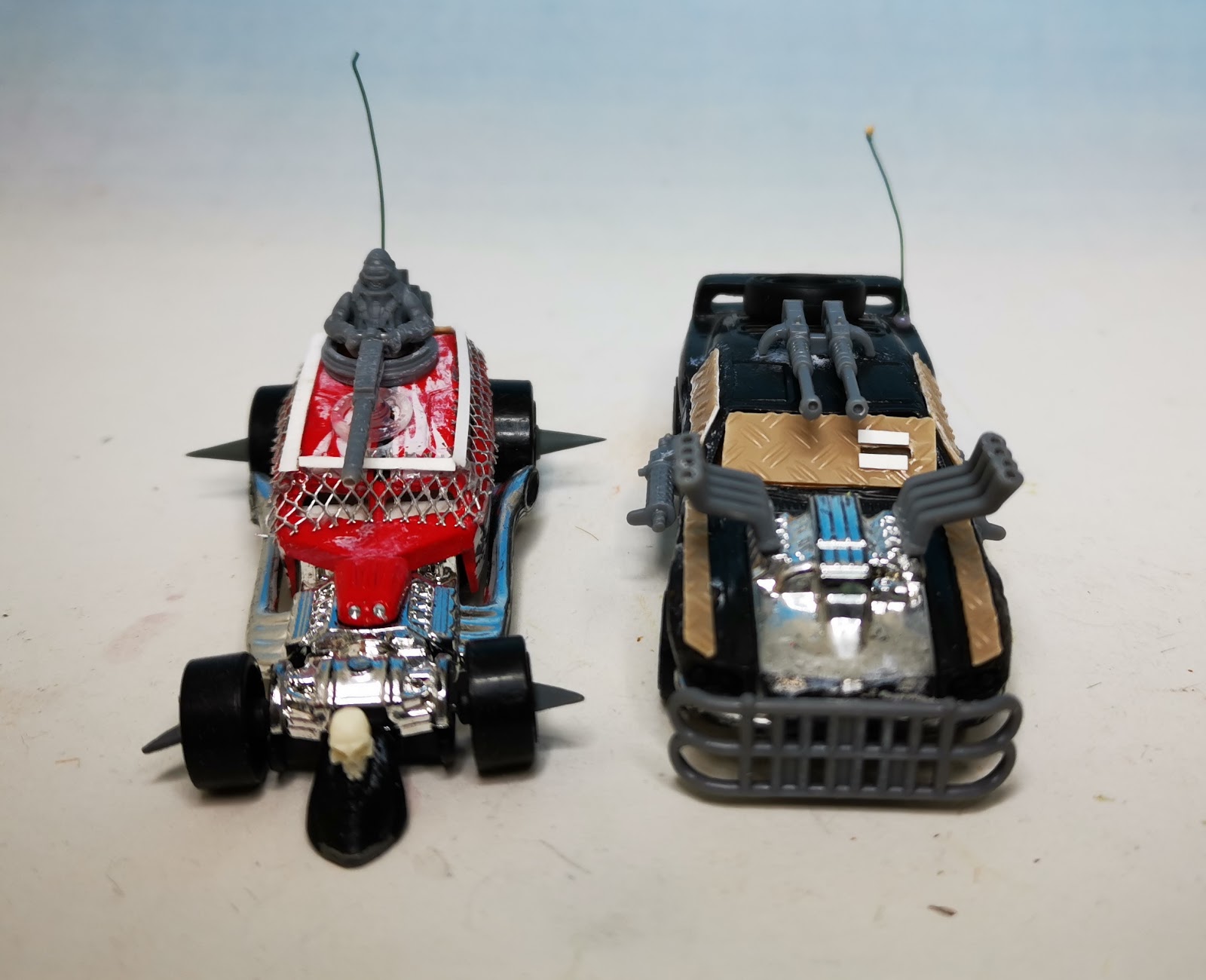
So I'm in. Up to my neck. I love converting and kit-bashing and trash-bashing so this is right up my desolate, post-apocalyptic highway. First of all I've already got a couple of 1:43 cars that would work for the game on a larger-than-Hotwheels-scale, namely my Fighting Fantasy Freeway Fighter and Helsreach Arrabella projects:


And for Christmas I received a 1:35 Tamiya half-track:


Which I've built:

And which is now in the process of getting a sci-fi/apocalyptic makeover. This will join the two previous vehicles to make my 28mm Gaslands team.

Of course I'm not stopping there. I found a bunch of my son's Hotwheels cars and I've started building another team in 1:65 scale, using some 40k bits and the excellent Implements of Carnage from NorthStar Figures. My first two cars:


Primed:


And undercoated in rust colours:


Oh and it won't stop there, here's the other cars I've collected to transform into post-apocalyptic Gaslands machines (you may notice a familiar looking orange car there...):


I shall keep you posted....

Thursday, 18 February 2016

Frostgrave Bestiary Challenge: 10 Ghouls

I absolutely love these Heresy ghoul models, I saw them years ago painted by Mika over on the Warhamner Forum and loved how he had created a great contrast between the ghouk's skin and the dark reds of the blood and gore. They are pretty dark miniatures (I found applying the blood and gore to the baby quite upsetting) but they are wonderful characterful sculpts that are a real pleasure to paint. There's actually not much to them, they are mostly flesh with a few other details so it was imperative that I got the skin tone spot on. I realised early on that it would have to have a green tinge so that it complemented the inevitable red of the blood, but I also wanted to create a layered, transparency it the skin too. This would be offset with the neutral grey basing. I also did a bit if research into how to create such blood and gore and foinf a great recipe to make the blood quite physical, see below. I usually steer clear of too much blood, but these ghouks, being cannibals and because of the additional details of body parts being butchered and eaten, these guys did need to have a realistic blood effect added.

So after some skin experiments (I'd already decided to veer away from my Orc skin recipe) I went for this approach:

White Primer
Earthshade wash
Small amount of earthshade plus increasong amounts of white, layered on for the highlights
Glazing with purples and blues in the shadows and especially apparent in the faces
Yellow glaze over the teeth
Then final glaze with green ink (and lots of medium) over the skin to remove any chalkiness from the highlighting.
Before the physical blood and gore was added (see below) I washed a mixture of purple and red inks to the hands, feet, knees and elbows (to create a little extra contrast and to break up the large areas of green skin).
Finally I prepped the areas that would be getting the blood effect with a combination of black, purple and red inks, increasing the amount of the latter where the blood was to be most fresh.

After weathering the bases I then approached the blood and gore. Quite simply I used a mixture of Tamiya Clear Red, black ink, UHU glue and a cocktail stick to mix the mess together and to apply it to the areas of stringy, gooey gore. The cocktail stick was used to stretch he goo between two surfaces , for example from mouth to floor. I didn't want to overdo it, so I had to keep restraining myself because it's a smashing effect and easily done. I decided that several of the models would not have any of this applied at all.

With regards to the Ghoul King who is digging out a grave, I decided to use a Tamiya weathering stuck (essentially an oil pastel the colour of mud) and applied this to the grave area, the base and dollop on his shovel too.

Lots of photographs to follow, as I have a new iPhone and have used this as an opportunity to experiment with it's focus and exposure corrections during the shot and it's editing abilities after. I'm pretty damn happy with these: